Email Automations: Your Follow-Up Emails, On Autopilot
.png)
Every customer who walks out of your tasting room, completes a purchase, or joins your club is a relationship worth nurturing. The problem is that most of the best follow-up moments happen in the hours and days after they leave, when your team is already on to the next thing. A thank you after a reservation, a nudge back to an abandoned cart, a birthday note that actually arrives on time. These touches matter. They're the difference between a one-time visitor and a loyal member who buys on release day and brings friends when they visit.
But follow-up emails are easy to skip when your team is stretched thin and the day moves fast. And when they do go out, they often go out late, off-brand, or not at all. Email Automations give you a way to stay in touch at exactly the right moments, without anyone having to remember to hit send.
Triggered by What Your Customers Already Do
Email Automations work by connecting to actions your customers already take: placing an order, booking a reservation, abandoning a cart, celebrating a birthday. You build the email once, set your timing and conditions, and the system handles the rest. Every trigger is tied to a moment that matters in DTC wine, so when your customer does something worth responding to, they hear from you automatically.
Five triggers are currently available:
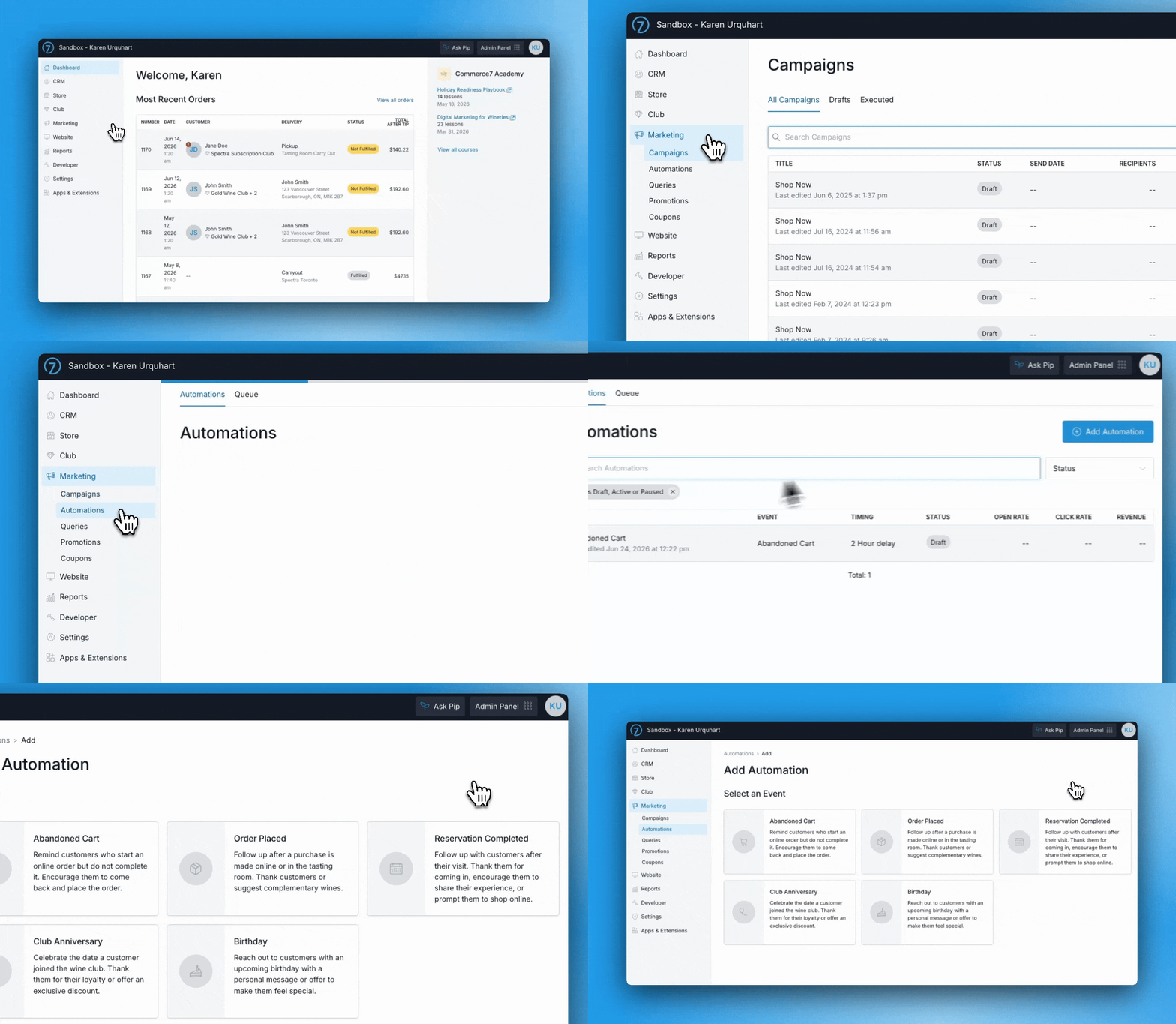
- Abandoned Cart: Automatically follow up when a customer leaves items behind. You can include a coupon, a gentle reminder, or just a nudge back to complete their order.
- Order Placed: Send a confirmation or follow-up tailored to what was purchased. If someone bought event tickets, give them everything they need before they arrive.
- Reservation Completed: Reach out after a visit with a thank you, a product recommendation, or an invitation to come back.
- Birthday: Send a personal note and a special offer in the week leading up to their birthday.
- Club Anniversary: Recognize the date a member joined and give them a reason to feel valued for it.
How to Get Started
- Log in to Commerce7 and go to Marketing > Automations
- Click Add Automation and choose an automation from the available list
- Set your conditions and timing
- Customize your email content
- Save the automation
The wineries that retain the most customers aren't necessarily the ones with the biggest marketing teams. They're the ones that show up consistently after the sale. Email Automations make that possible without adding headcount or complexity.
If you're curious what that looks like in practice, book a time to chat with our team and we'll show you.


.png)
.png)
.png)
.png)
.png)
.png)
.png)
.png)
.avif)

Pour yourself a glass of insight.