Ask Your Data Anything. Get Real Answers, Instantly.
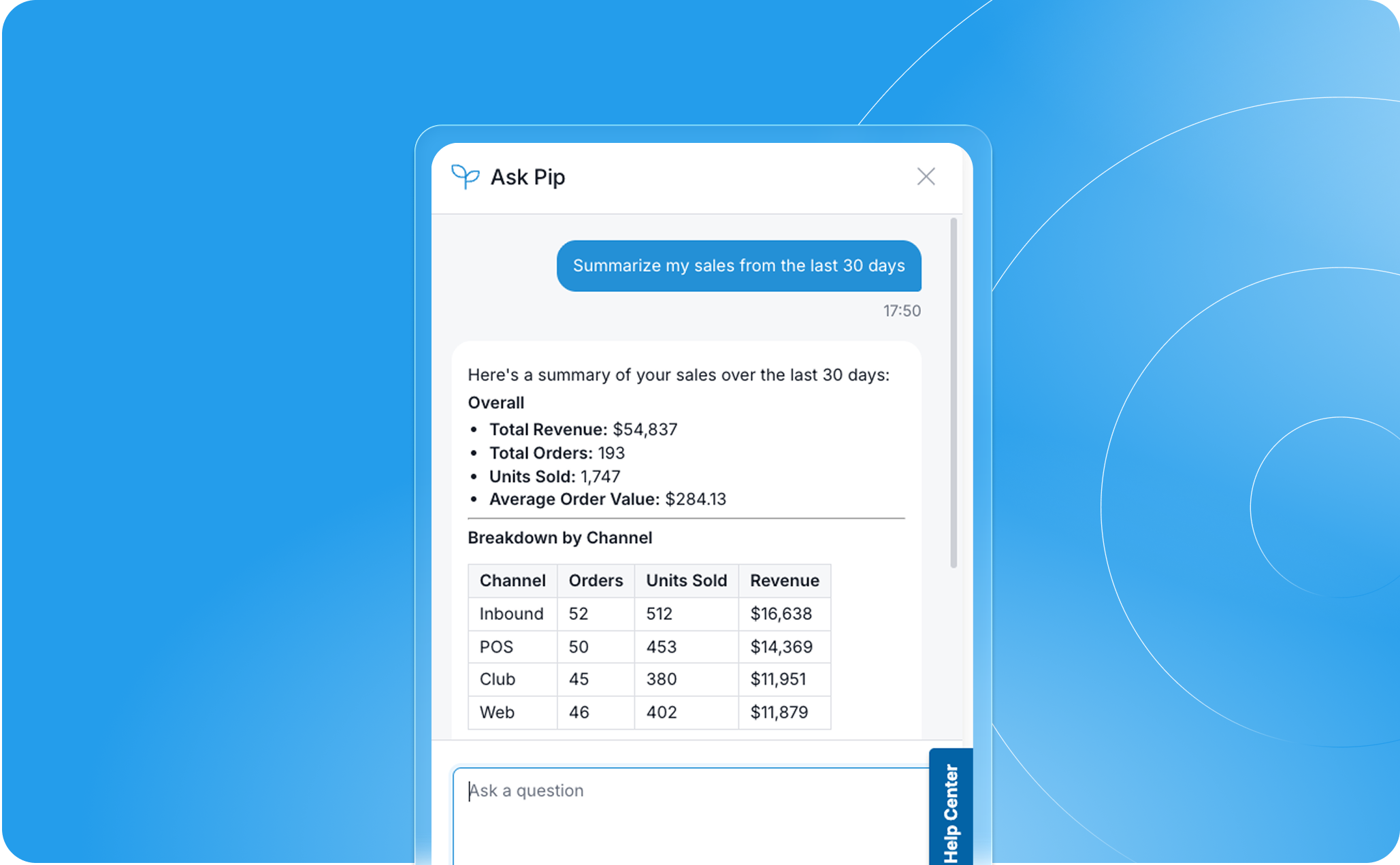
Most winery teams know their data holds valuable insights. The problem has never been the data itself, it's been getting to the answer. Exports, filters, custom reports, or a request to someone else on the team. Ask Pip skips all of that. Ask your question, get a real answer from your live data, in seconds.
Ask Pip: Your Data, In Plain Language
Ask Pip is a new AI-powered data assistant built directly into Commerce7. You type a question in plain language, and Pip returns a real answer from your live data in seconds. No exports, no filters to configure, no reports to build.
The interface works exactly the way it sounds. Type "Show me my top 10 customers in California" and there they are. Ask "Which club members haven't visited in over a year?" and Pip surfaces the list, right there in the chat, with an inline suggestion to tag them and send an email without ever leaving the screen. The entire interaction happens inside Commerce7, running against your real-time data. Nothing is sent to a third party.
Pip is also honest about what it doesn't know. If the data to answer your question doesn't exist, it tells you so rather than fabricating a result. That matters when you're making decisions about real customers and real revenue. You can act with confidence because the answers you're getting are grounded in what's actually there.
The questions you can ask span your entire Commerce7 dataset. Here are a few examples to get you started, but if the data exists in Commerce7, you can ask Pip about it:
- Club member health: "Show me club members with a high churn prediction score" — catch at-risk members before they cancel, not after.
- Purchase behavior: "Which customers bought our reserve tier in the last six months but haven't visited this year?" — find your warmest prospects for a tasting room re-engagement.
- Sales performance: "Summarize my sales from the past 30 days" or "Show me my top 10 selling SKUs from the past six months" — get a clear read on what's working without pulling a single report.
- New visitor follow-up: "Show me first-time visitors from the last 30 days who are from out of town" — identify the people most likely to convert to club or DTC before they go cold.
- Engagement gaps: "Which customers have liked a product but haven't placed an order since?" — surface a ready-made re-engagement list hiding in your own data.
These five categories are just a starting point. Any question your team would normally bring to a report or a spreadsheet is worth asking Pip first.
How to Get Started
- Log into Commerce7 and open Ask Pip from the top admin bar on the right hand side. Only those with reporting permissions will have access to Ask Pip.
- Type your first question or request in plain language.
- Review the results. Follow Pip's inline suggestions to tag, email, or take action directly from the response.
- Keep chatting. The more specific your questions and requests, the more useful the results.
With Ask Pip, you don't wait for a report or put it on someone's plate. You ask, and you get an answer in seconds.
Ask Pip is available now to all Commerce7 customers with reporting permissions. Log in and ask it something. If you don't have a Commerce7 account but are curious what your data could say if you just asked it, book a demo to chat with our team and see what's possible.



.png)
.png)
.png)
.png)
.png)

.png)


.png)

.png)








.png)
.avif)







Pour yourself a glass of insight.